Posts

Showing posts with the label Autodesk Revit Model Review

Model Checking - What Tools Do You Use?

Working on updating my Modeling checking presentation for RTC EU. There are a lot of good model checking tools on the market including but not limited to: Autodesk Revit Model Review Autodesk Model Checker for Revit BIMAssure Assemble Systems Insight Solibri I am interested in hearing about other tools that people might be using for model checking in addition to those listed above.

Autodesk Revit Model Review - Workset Checking

Image
If you have read any of my previous posts about Model Checking, then you are probably aware of how much I like Autodesk Revit Model Review. It’s free and it is fairly easy to use. When it comes to model checking, free and easy to use are important options. At Davis Consulting, when we are tasked by a client to check models (cost is typically $400-1200 depending on complexity of model and standards to follow) we need to perform some kind of check on the worksets. There are numerous ways to do this, but we like to use automation as much as possible to reduce the time and the cost of the checking process. Unfortunately, workset checking  with Autodesk Revit Model Review has some issues and is one area where Autodesk Revit Model Review needs to be improved upon. In the example I am going to show, we are going to check a model to make sure that all Interior Doors are in the Interiors workset. The shortcoming with Autodesk Revit Model Review is that we can’t just create a check that que...
Autodesk Revit Model Review - Duplicate Element Check

Image
In my last Model Checking post, I covered using the CADD Microsystems Revit Model Checker to search for duplicate elements. Autodesk has their own Model Checker which can be downloaded from the app store. It seemed to disappear for awhile (maybe I wasn't looking hard enough), but it's back for 2016 and I hope Autodesk puts the previous versions back up. I really like the Autodesk tool. It's simple, yet provides a great deal of flexibility for checking models. Within a couple hours, you can create an entire checkset for a project. The Model Review also has a API that allows you to create custom checks. The only disappointment that I have with the product is related to workset checking. There is not a way to check for specific worksets easily, due to the way Revit stores workset values. I'll cover this in a future post. I'm going to walk thru the process of creating a rule in Autodesk's Revit Model Checker for checking for duplicate elements. The Autodesk Revit Mo...

AUx Dubai - Advanced Model Checking

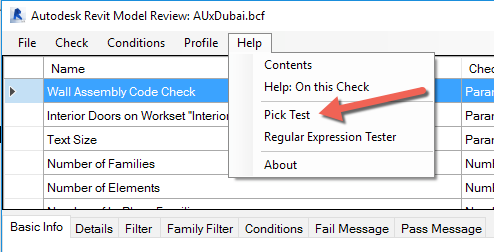
I want to thank everyone that attended my Advanced Model Checking class at AUx Dubai. The presentation can be found at our company website: http://davisconsultingservicesllc.com/index.html

Autodesk Revit Model Review - Migrating 2014 check files to 2015

Image
If you are a Autodesk Revit Model Review user and you try to migrate a 2014 check file to 2015, you will get the following error: I have not found any workarounds other than creating the rules again for 2015 from scratch.

Autodesk Revit Model Review - Checking Sheet Names

Image
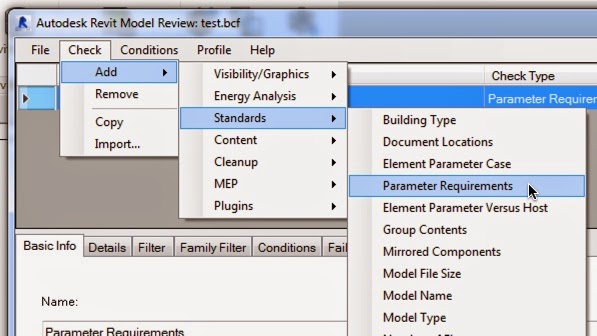
Autodesk Revit Model Review is a very powerful tool for checking the contents of your model. A friend asked me how he could use Revit Model Review to check the naming of Sheets in project files. This is fairly easy. The first step is to define a new check in Model Review. For this particular check, we are going to check the Parameter Requirements which is part of the Standards checks (Figure 1). Figure 1 - Creating New Check The next step is to define the "details" of the check. For this rule, we are going to check the Revit parameter sheet name to make sure that the aheet name starts with "ARC-". The easiest method to begin to define the details is to click on the Pick Element And Choose Parameter button. This will allow you to select a model element. For this example, we will select the titleblock. Figure 2 - When you select the titleblock, the Element Property List dialog (Figure 3) will open. Scroll thru the list to find the parameter that you want to check. ...

Autodesk Revit Model Review

Image
I have been working on a number of different projects with a wide array of client standards. Making sure that models are complaint with those standards can be difficult. Fortunately, Revit has something called Autodesk Revit Model Review. It's a tool that is available as part of your subscription package that, in short allows you to run checks against your model files. Some examples of the checks you can preform are: Model Naming Report Walls are unconnected to a level Number of Filled Regions Text heights that are different from approved heights Autodesk Revit Model Review has been around for awhile and I believe that it was originally developed by IMAGINiT and I think it is one of the most under utilized tools. I have been spending a lot of time developing new checks for Model Review, so I thought I would share some of those. The first check I thought I would share is finding the number of In-Place families in a project. Begin by opening up the Revit Model Review Manage dialog to...

Autodesk Revit Model Review - Admin Access Requirement

Image
If you have tried using Autodesk Revit Model Review to either edit and existing checkset or create a new one and you are not a system administrator, you might have run into two known issues. Autodesk Model Review is installed in the \Program Files (x86)\ folder and that requires admin access to edit (thanks for pointing that out Daniel - I should look at the Help file more often). Another issue with the installation is the default output folder (location where checks results will be saved to) is set during installation to the installing user’s documents folder, which as only admins can install, is a folder which the normal users don’t have access rights (thanks Brendon). If you are not an Admin, you can still create and edit checksets. You just can't save then to the default folder. If you want to run those against models though, we have to alter the ModelReview.config file and that is going to require Admin access. To change the location of the output file and add a new checkset, ...